Insurance Claims
HIPAAtherapy can send insurance claims on your behalf, track whether the payer accepted them for processing, and show what the payer ended up paying.
What’s in scope today
Section titled “What’s in scope today”HIPAAtherapy currently supports:
- Eligibility checks - confirm a client’s coverage and benefits before the session
- Claim submission - send professional insurance claims (837P files) to the payer through Stedi (our insurance clearinghouse partner)
- Payer enrollment - register your practice with Stedi (our clearinghouse partner) and enroll with each payer for the transactions they require, then track where each enrollment stands
- Acknowledgment tracking - receive claim status responses through Stedi and surface accepted or rejected status on the claim
- Payment and denial tracking - read the payer’s payment report (835 ERA) on the claim: amount paid, denials with reason codes, reversals, and the client’s share
- Automatic payment posting - record what the payer paid to your payment ledger automatically
- Rejected claim correction and refile - fix a rejected claim and refile it as a fresh submission
- Replace and void - once the payer confirms a claim with a control number, send a corrected version or void the claim entirely
What HIPAAtherapy does not do yet is covered under current limitations.
How a claim moves through HIPAAtherapy
Section titled “How a claim moves through HIPAAtherapy”You check eligibility, then fill in diagnosis codes, place of service, and the services being billed (service lines) on the session and submit. From there:
Who talks to whom
1 Check eligibility , from You to Payer and back. Coverage and benefits come back
2 Submit claim , from You to HIPAAtherapy. Diagnoses, place of service, service lines
3 Sends the claim , from HIPAAtherapy to Stedi. 837P
4 Forwards it , from Stedi to Payer. To the payer
5 Acknowledgment , from Payer to HIPAAtherapy. 277CA: claim shows Accepted or Rejected
- Usually a few weeks while the payer processes it
6 Payment report , from Payer to HIPAAtherapy. 835 ERA: Paid, Denied, Reversed, or Processed. Needs ERA delivery enrollment
HIPAAtherapy checks for new acknowledgments and payment reports automatically, so claims update on their own. Payment reports need a live ERA delivery enrollment with the payer.
Before you submit a claim
Section titled “Before you submit a claim”A few pieces of data have to be in place before you can submit a claim.
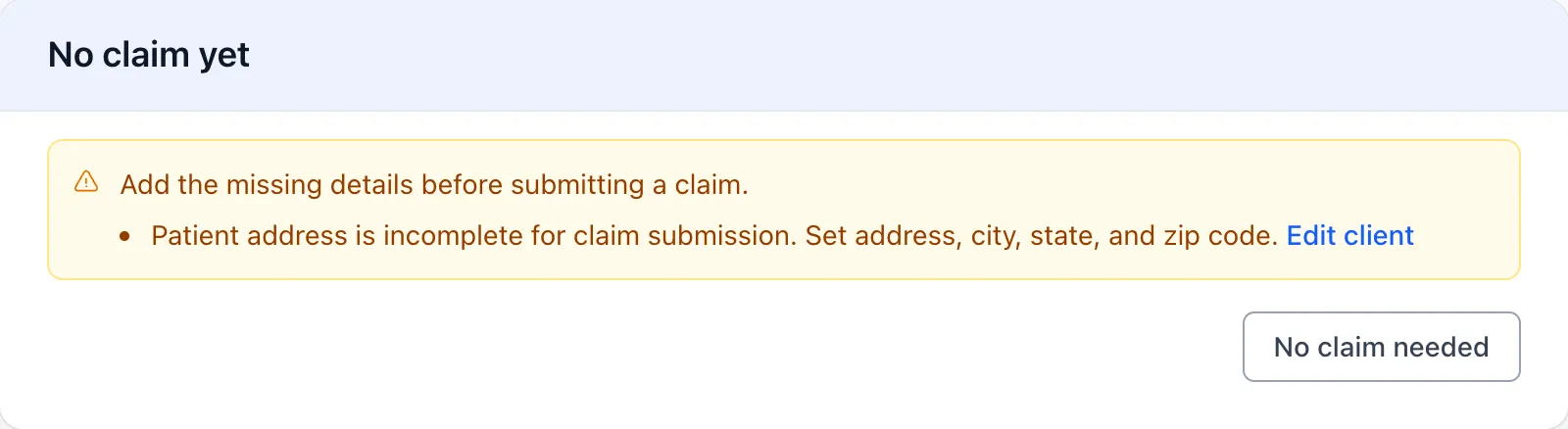
Three places to fill in before Submit claim appears
- NPI
- EIN
- Office phone
- Taxonomy code
- Office address, with zip code
- Taxonomy code
- NPI, only if it differs from the practice's
- Date of birth
- Current address
- Insurance with member ID
- Group and policy numbers, when the plan uses them
Checking eligibility
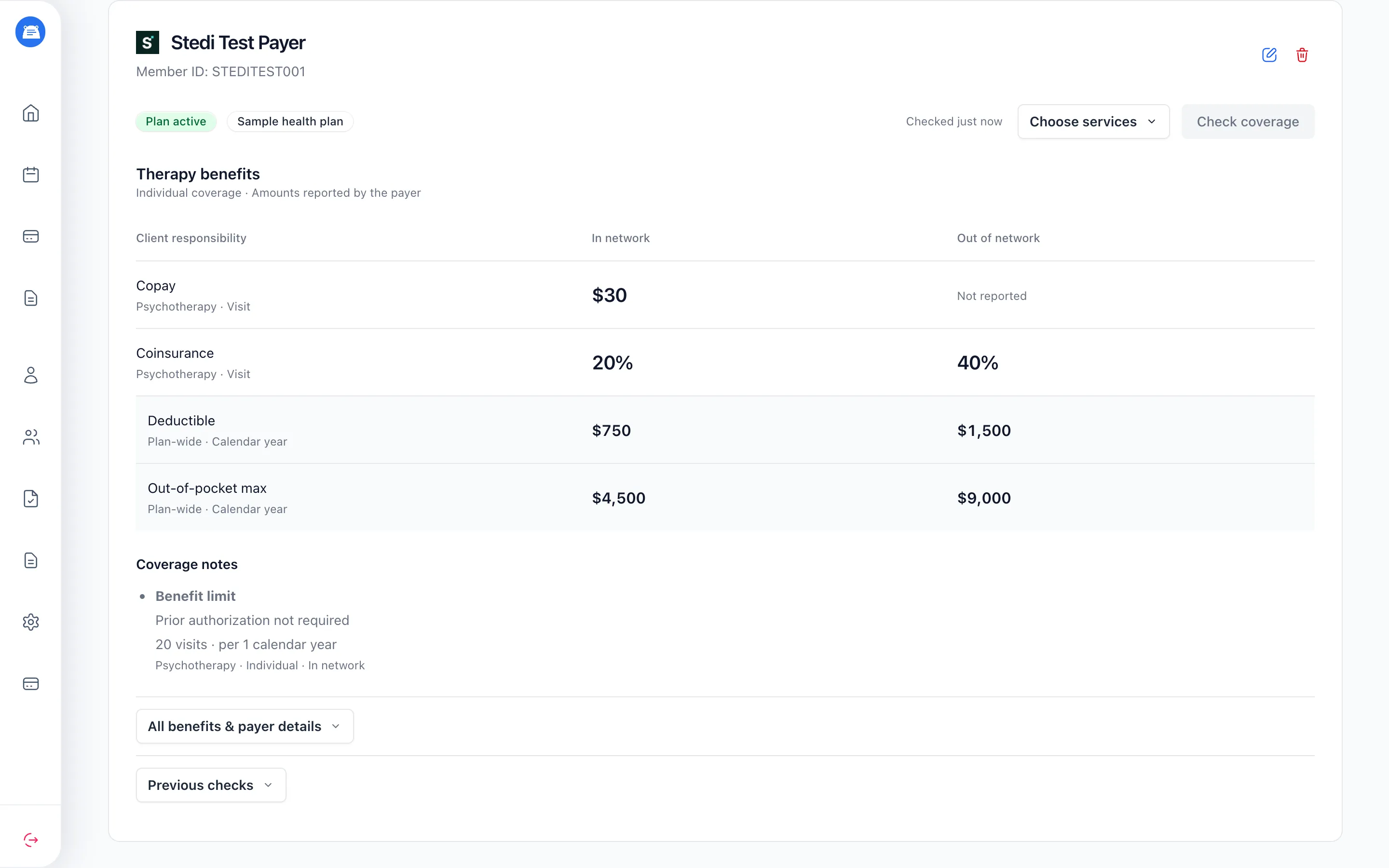
Section titled “Checking eligibility”- Open the client’s profile and find their plan under Insurance, or add one if it’s missing.
- Use Choose services to review what you’re checking. The first check defaults to Plan coverage, Mental health, and Psychotherapy. Later checks use the previous selection for that insurance.
- Click Check coverage. Results appear when the payer responds.
Read Coverage notes for visit limits, authorization requirements, and out-of-network warnings.
Not reported means the payer didn’t supply that information. An active plan alone doesn’t confirm therapy coverage.
Checks require an NPI on the therapist’s profile or practice settings and a payer that supports eligibility checks.
Submitting a claim
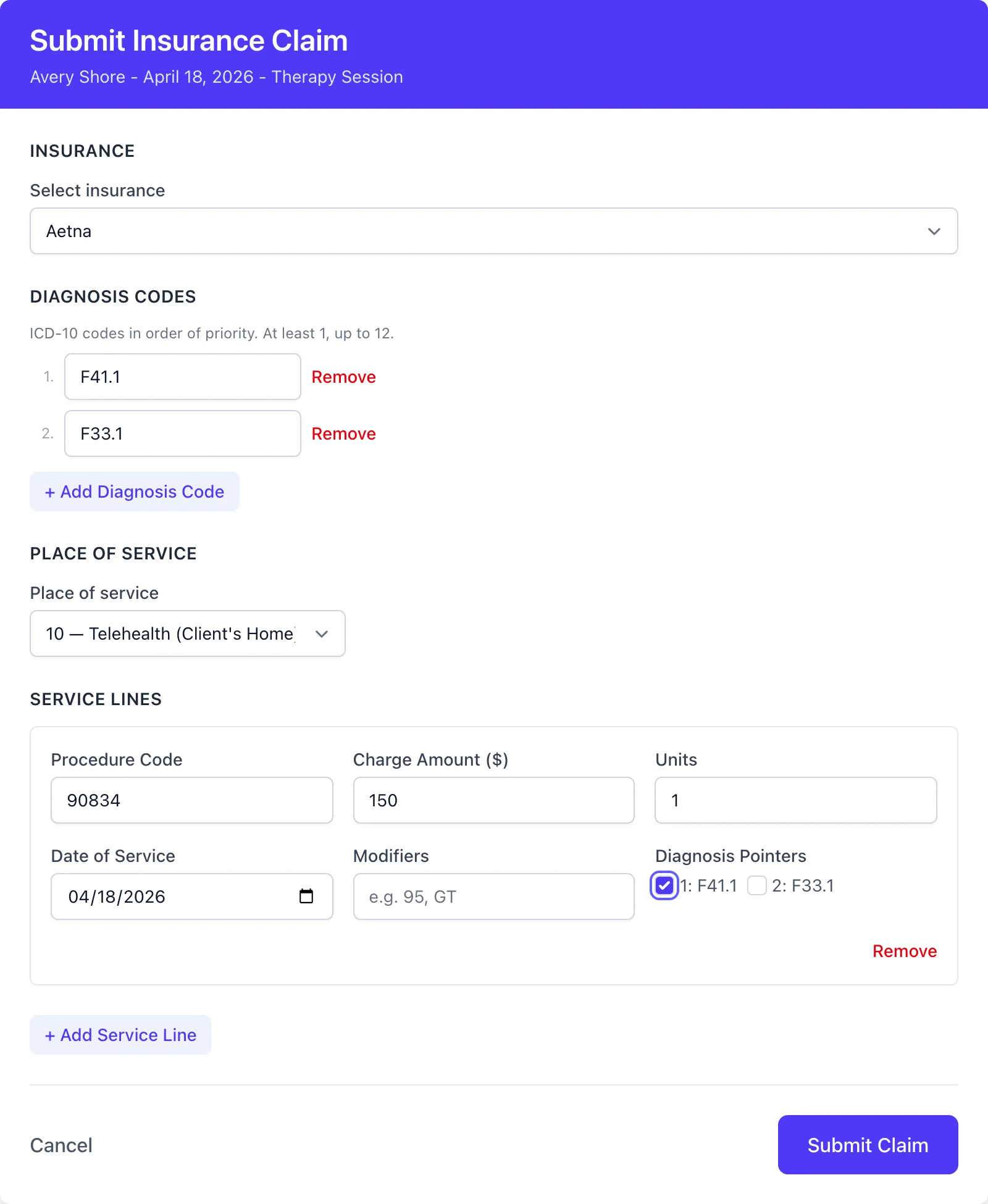
Section titled “Submitting a claim”- On the session page, click Submit claim
- Pick the insurance, diagnosis codes (up to 12, in priority order), place of service, and one or more service lines
- Click Submit Claim
If you won’t bill the payer for a session - the client is paying out of pocket for it, say - click No claim needed instead. Undo reverses it.
If several clients attended the session, each of them can be claimed for on their own. A couples or family session is usually one claim; group therapy is a claim per member, each under that person’s plan with their own diagnoses and service lines. See Couples, Families & Groups.
The claim moves through these states:
Where a claim can go
Correct and refile (after a payer rejection) and Submit new claim (after a Stedi rejection or a failure) open a fresh claim for the same session, which starts again at Pending.
| State | What it means |
|---|---|
| Pending | The claim has been queued but hasn’t been transmitted yet |
| Submitted | Stedi accepted the claim; the payer hasn’t responded yet |
| Accepted | The payer sent a claim acknowledgment (277CA) indicating the claim was accepted for processing |
| Rejected | Stedi or the payer rejected the claim |
| Failed | The submission hit an error; after a timeout, delivery may still be unconfirmed |
Once the payer finishes processing and sends its payment report, the claim moves past Accepted to one of these:
| Status | What it means |
|---|---|
| Paid | The payer finished processing and paid the claim |
| Denied | The payer processed the claim but won’t pay it |
| Reversed | The payer took back a payment it had issued earlier |
| Processed | The payer finished processing, but the charge went to the client or no payment was issued |
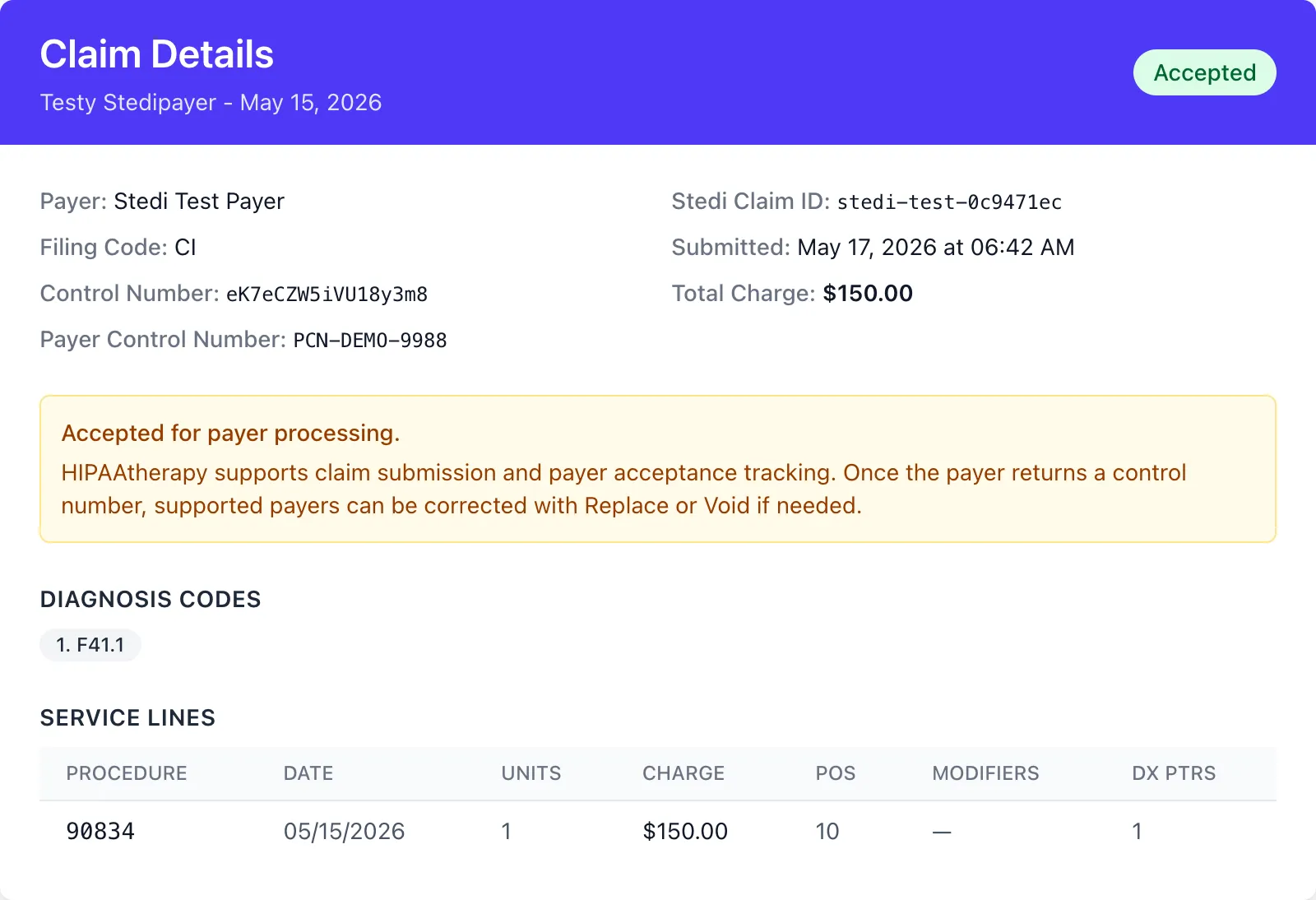
“Accepted for payer processing” doesn’t mean the claim has been paid. It means the payer accepted the claim into its processing workflow. Final payment, denial, and adjustment details arrive later on a separate payment report (the 835 ERA); when it does, the claim’s status changes to reflect the outcome. See Payments and denials.
When a payer isn’t ready for claims
Section titled “When a payer isn’t ready for claims”Most supported payers accept claims as soon as your practice’s billing details are in place. Two cases are different, and the claim form tells you which one when you pick the insurance.
The payer requires enrollment. Some payers won’t accept claims until your practice has enrolled with them. You can’t submit to them until the enrollment goes live. Admins complete it on the Insurance settings page; other staff need a practice admin to do it.
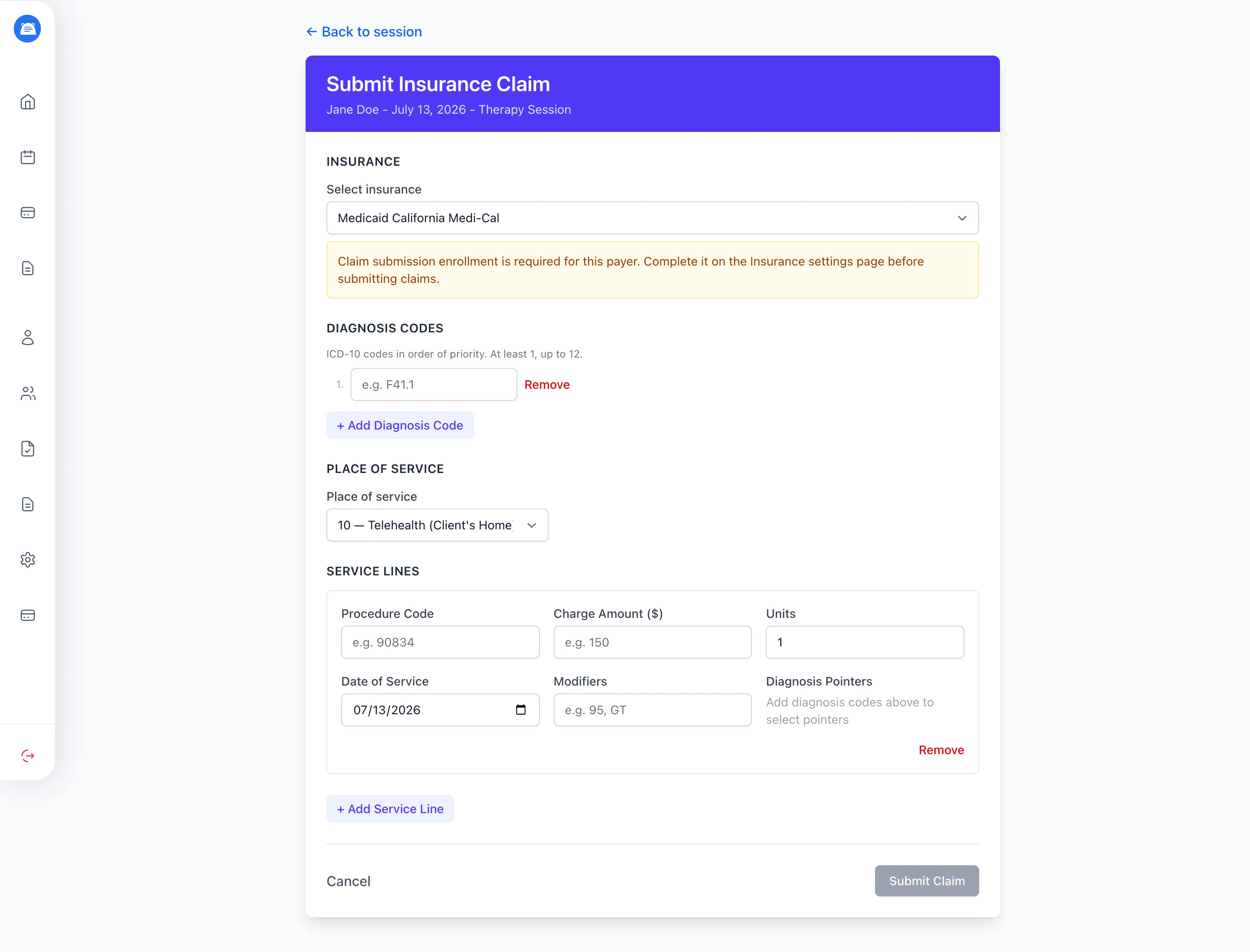
See Enrolling with payers for how to complete it. Once the enrollment is live, the warning clears and you can submit as usual.
The payer isn’t supported. The form shows a warning and disables Submit Claim.
Eligibility checks remain available when the payer supports them, even if claim submission is unavailable or needs enrollment.
What a claim sends
Section titled “What a claim sends”- Client demographics - name, date of birth, and address
- Practice and provider details - NPI, EIN, taxonomy code, office address and phone
- Payer details - the plan, member ID, and group or policy numbers when the plan uses them
- Diagnosis codes - up to 12, in priority order
- Place of service - where the session happened
- Service lines - procedure code, charge, units, date of service, modifiers, and the diagnosis each is tied to
Enrolling with payers
Section titled “Enrolling with payers”Some payers won’t accept electronic claims - or send electronic remittances - until your practice has enrolled with them. Enrollment lives in Practice Settings > Insurance and is admin-only: other staff won’t see the tab. There are two steps - register your practice with Stedi once, then enroll with each payer.
Register once, then enroll payer by payer
- Organization name, 5+ characters
- Practice NPI
- EIN
- Office address with zip, 10-digit US office phone
- PTAN, when the payer asks for one
Already getting ERAs for a payer through another clearinghouse? Enrolling for ERA delivery here moves that delivery to Stedi.
Register your practice with Stedi
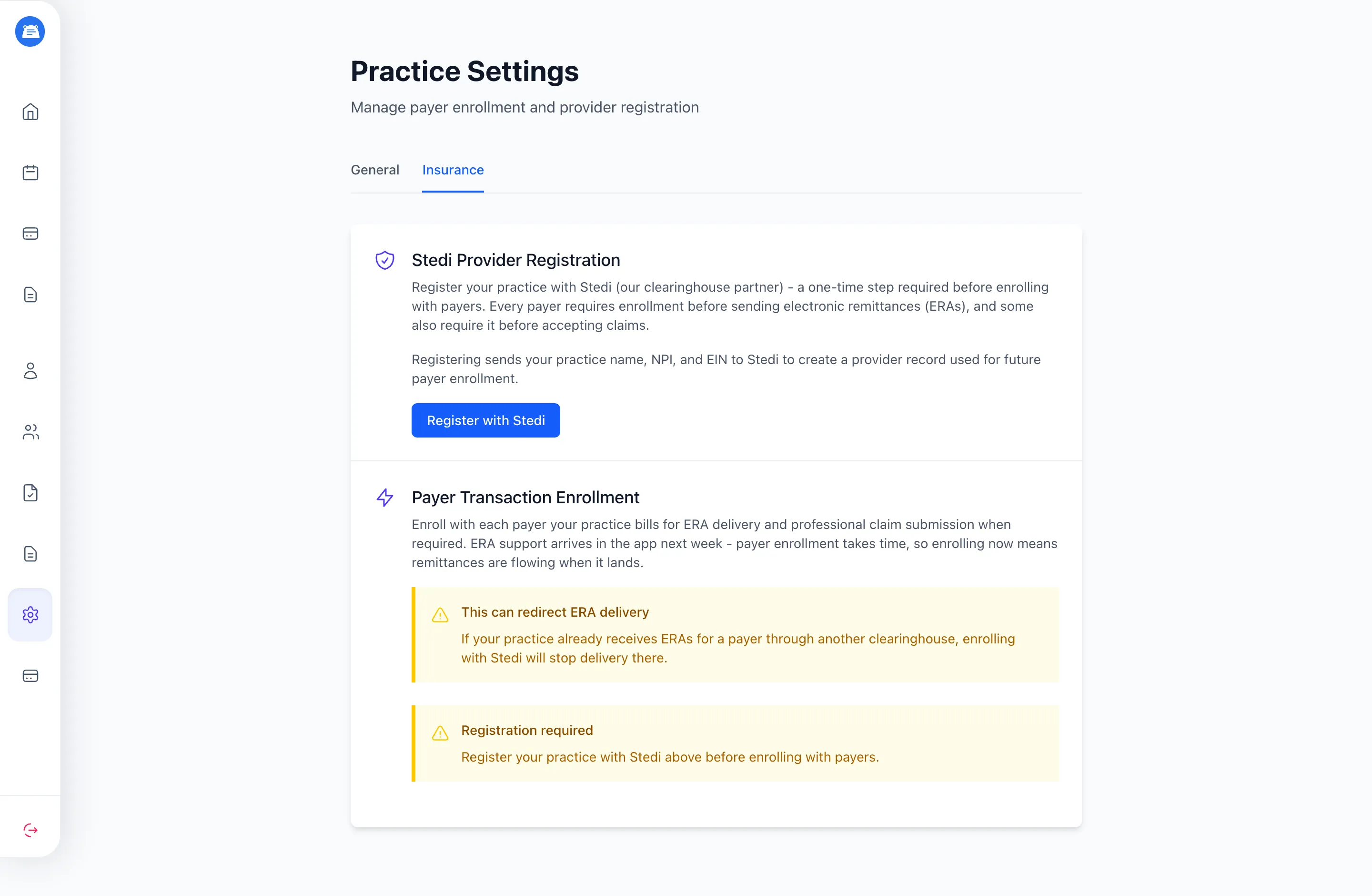
Section titled “Register your practice with Stedi”This is a one-time step, and every payer enrollment builds on it. Registration sends your practice name, NPI, and EIN to Stedi to create a provider record.
You’ll need these in your practice settings first:
- Organization name, at least 5 characters
- Practice NPI
- EIN
If any are missing, the page lists them in place of the button. Once they’re set, click Register with Stedi. Registration runs in the background - the page shows it’s in progress and then, once it completes, your Stedi provider ID and the date you registered.
If you later change your practice NPI or EIN, enrollment pauses until the provider record is reconciled - the page shows a notice when that happens, so keep those two fields stable once you’ve registered.
Enroll with each payer
Section titled “Enroll with each payer”The enrollment list shows the payers your practice actually bills. It’s built from the insurances on your clients’ records, so a payer appears once at least one client has that plan on file - if the list is empty, add insurance to a client first. Each payer can show up to two enrollments:
- ERA delivery - lets the payer send its electronic remittance (the 835 payment report) through Stedi. Most payers support it; when one doesn’t, the row says so instead of offering enrollment.
- Professional claims - shown only for payers that require enrollment before they’ll accept your claims. Payers that accept claims without it don’t show this row.
Enrollment also draws on your practice billing settings - on top of provider registration, it needs your office address (with zip code) and a 10-digit US office phone. Click Enroll next to the transaction you want; if either is missing, the page brings you back with a note naming what to add. A few payers ask for a Provider Transaction Access Number (PTAN) - the form shows a field for it when it’s required. Submit, and the enrollment goes to Stedi and on to the payer.
Heads up: if you already receive ERAs for a payer through another clearinghouse, enrolling for ERA delivery with Stedi moves that delivery to Stedi and stops it at the other one.
Tracking enrollment status
Section titled “Tracking enrollment status”Enrollment isn’t instant. How long a payer takes to approve is up to the payer - it can be minutes or weeks. HIPAAtherapy checks for updates automatically, and you can click Refresh status on any in-progress enrollment to check right then.
From Enroll to live
| Status | What it means |
|---|---|
| Queued for submission | The enrollment is waiting to be sent to Stedi |
| Stedi is processing | Stedi is processing the enrollment |
| Waiting on the payer | The enrollment is with the payer; approval can take several days |
| Action required | The payer needs something from you before it can finish - see Enrollment tasks |
| ERAs are flowing / Claim submission enabled | The enrollment is live |
| Rejected | The payer declined the enrollment; the reason shows on the row |
| Canceled | The enrollment was canceled |
If sending an enrollment to Stedi hits an error, the row shows the message and a Retry button.
Once a Professional claims enrollment is live, the enrollment-required warning clears on the claim form for that payer and Submit Claim works normally. A live ERA delivery enrollment turns on the payment report, so paid, denied, and adjustment outcomes show on the claim - see Payments and denials.
Enrollment tasks
Section titled “Enrollment tasks”Some payers want extra steps before they’ll finish an enrollment - a form to fill in, a document to upload, or a value only you have. When they do, the enrollment shows Action required with the task listed underneath. Handle it right on the page: fill in the fields or attach the requested PDF (tasks that ask for a file expect a PDF) and click Complete task. Some tasks include instructions or a link to the payer’s own form.
A few task types can’t be handled in the app yet. For those, the page points you to Stedi’s provider portal to finish the step.
Reading the claim status
Section titled “Reading the claim status”Accepted claims
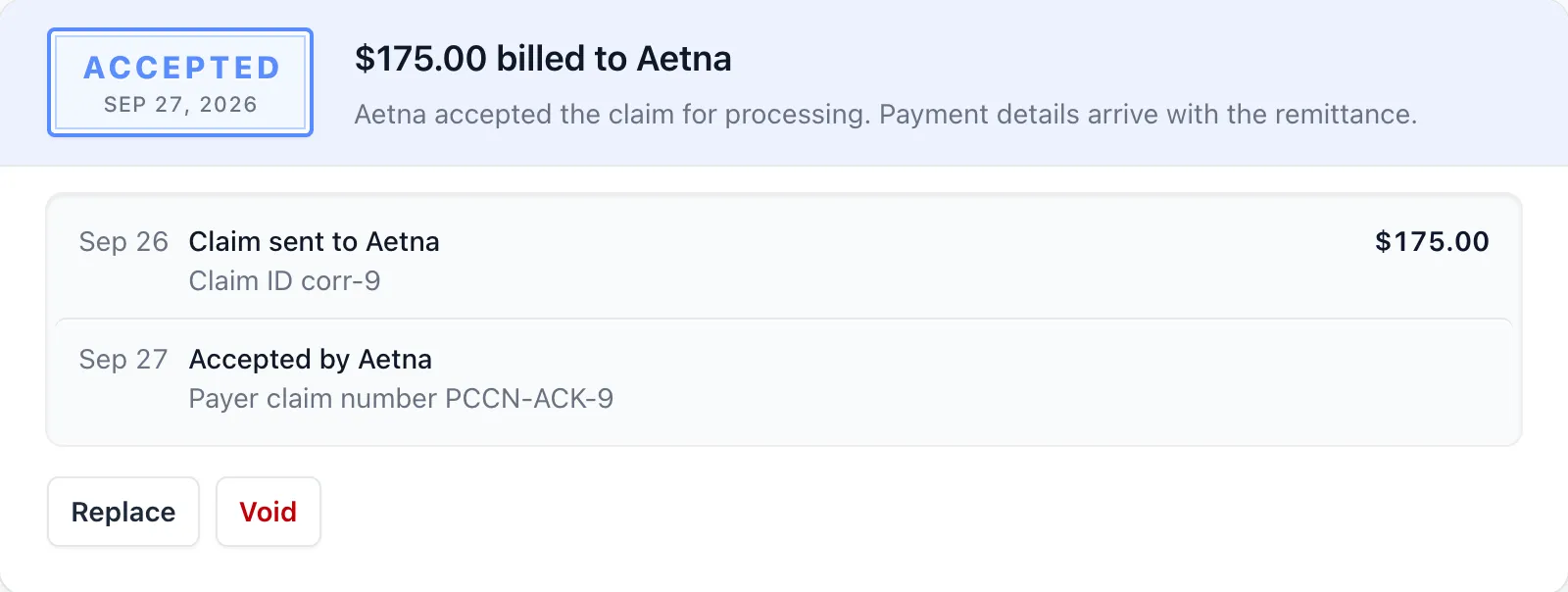
Section titled “Accepted claims”An accepted claim has entered the payer’s review process. While the payer works it, the claim shows Accepted for payer processing. Once the payer also returns a claim number, the claim becomes eligible for in-app corrections - see Correcting an accepted claim below.
When the payer finishes and sends its payment report, the claim moves to a payment status - Paid, Denied, Reversed, or Processed. See Payments and denials.
Rejected claims
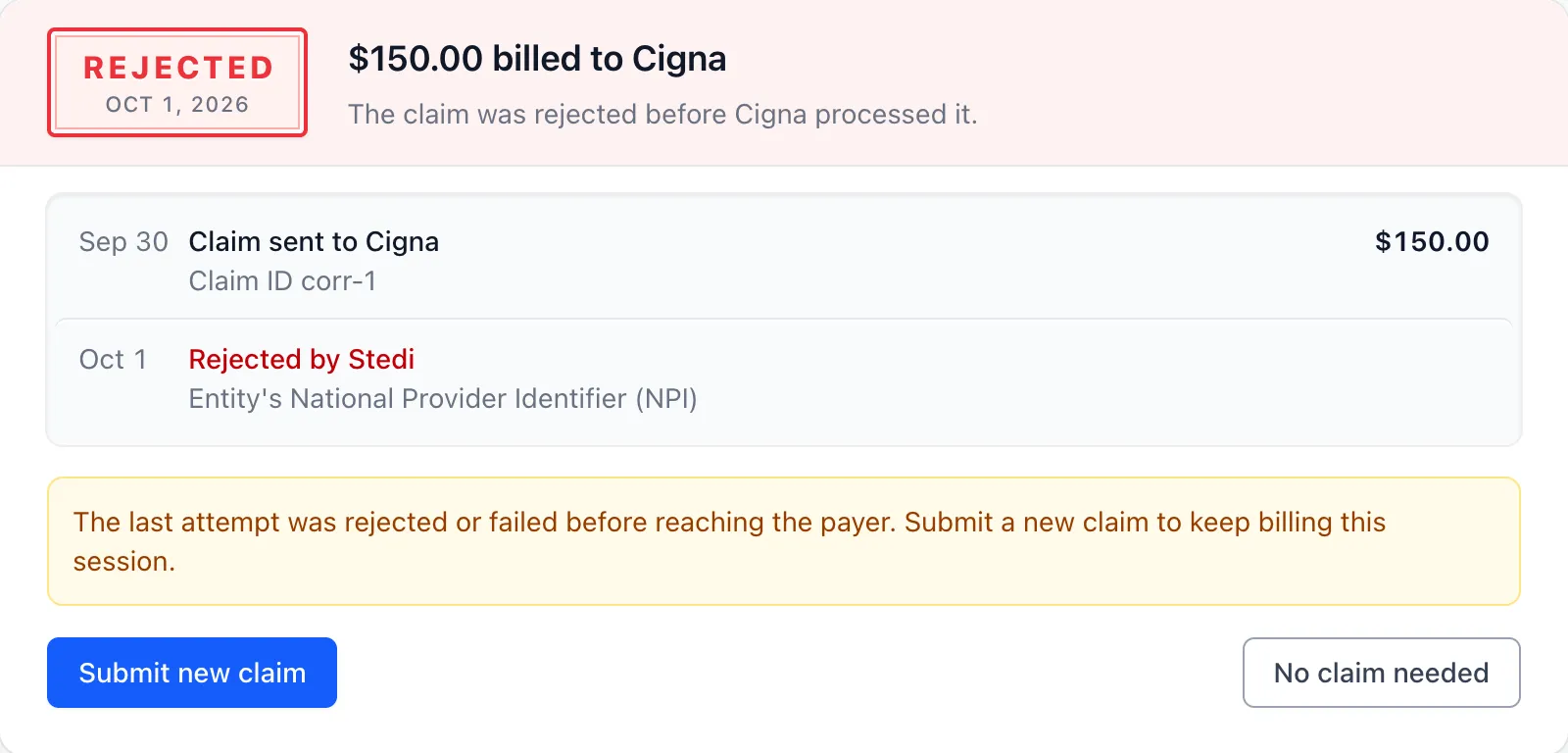
Section titled “Rejected claims”A rejection can come from two places: Stedi (the claim failed Stedi’s claim validation checks - called claim edits - so the payer never saw it) or the payer (the payer received the claim but won’t put it through review). Typical payer rejections: an invalid NPI, a member ID that doesn’t match the payer’s records, or a mismatch between a service and the diagnosis it’s tied to. Either way, the rejection message is shown on the claim.
To resolve a rejected claim, use the actions on the claim card:
- Correct and refile - after a payer rejection, opens a fresh claim form for the same session. Make your corrections and submit.
- Delete - removes the rejected claim if you don’t want to refile.
When Stedi rejected the claim, or it failed to send, the payer never saw it. Fix the problem and click Submit new claim.
Payments and denials
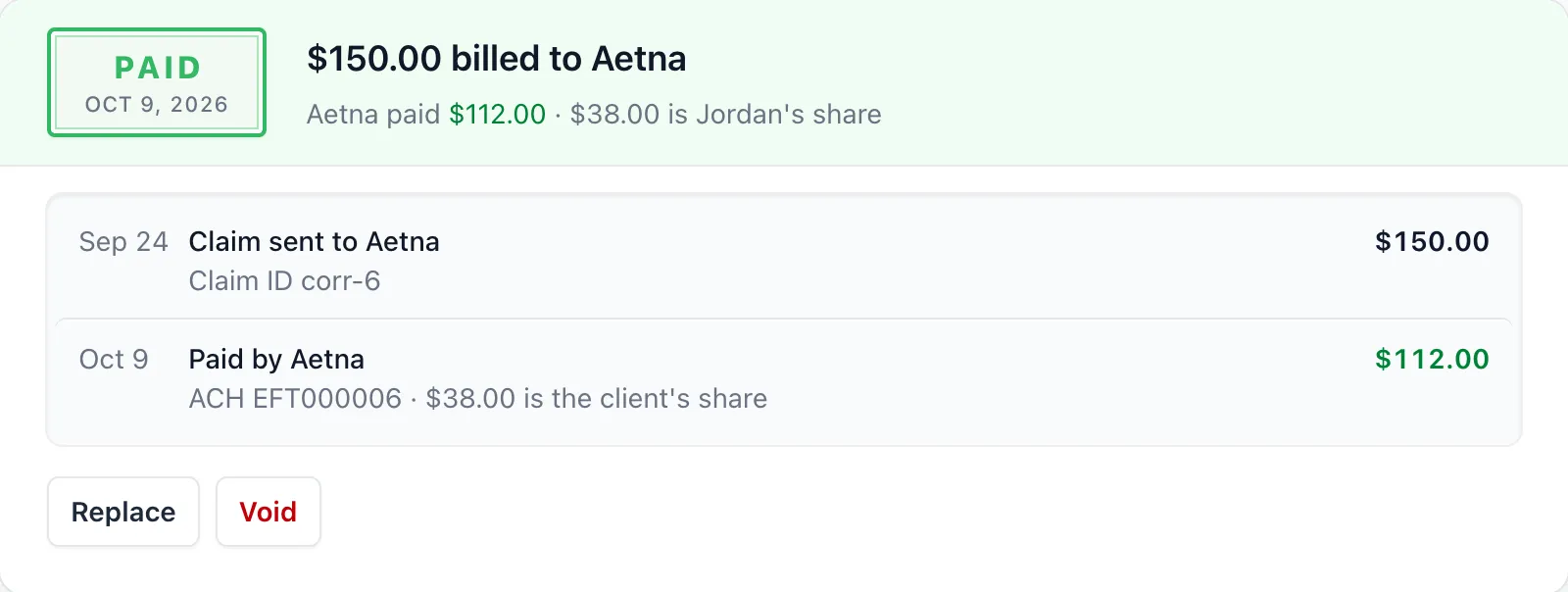
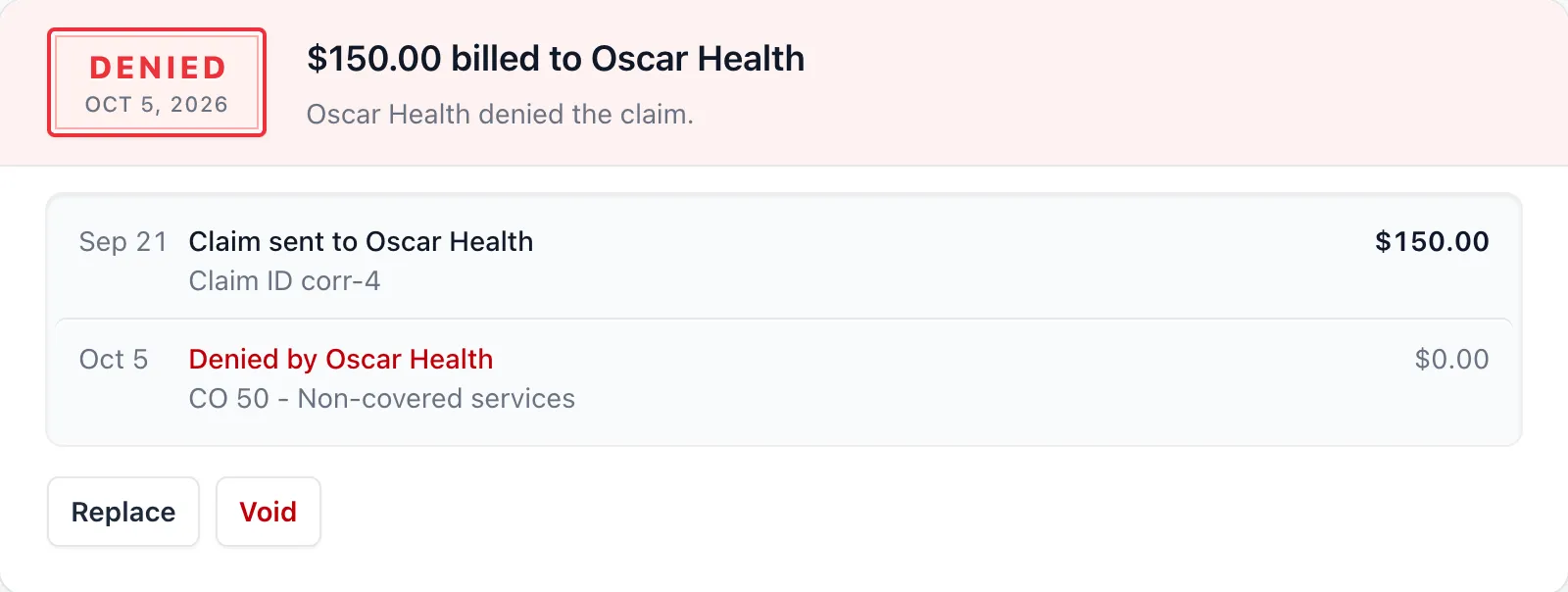
Section titled “Payments and denials”Once the payer finishes processing an accepted claim, it sends back a payment report - the 835 ERA (electronic remittance advice). HIPAAtherapy reads it and updates the claim’s status to Paid, Denied, Reversed, or Processed, with the details right on the session’s claim card - so you can see what the payer decided without opening the payer portal.
These reports only arrive once your ERA delivery enrollment with the payer is live.
Depending on what the payer reported, the claim shows one of:
| Outcome | What it means |
|---|---|
| Paid $X by [payer] | The payer adjudicated the claim and issued payment |
| Denied by [payer] | The payer processed the claim but won’t pay it; the denial reason codes appear underneath |
| Payment reversed by [payer] | The payer is taking back a payment it issued earlier, usually correcting an overpayment |
| Processed; $X is the client’s responsibility | The payer applied the charge to the client’s deductible, co-pay, or coinsurance instead of paying it |
| Processed; no payment issued | The payer finished processing but neither paid nor left a balance to the client |
Payment reports arrive automatically, the same way acknowledgments do, so you don’t have to do anything to pull them in. How long the payer takes to send one is up to the payer - usually a few weeks after acceptance.
Paid reflects the payer’s report; it doesn’t confirm the money has reached your account.
A denial carries the payer’s claim-level adjustment codes, which tell you why the claim wasn’t paid. Line-level adjustments and remark codes aren’t shown in the app, so check your payer portal or EOB when you need the full breakdown before you refile or appeal.
What happens to each part of a paid claim
When the payer pays, HIPAAtherapy records that payment in your ledger for you - it shows up in your Payments list.
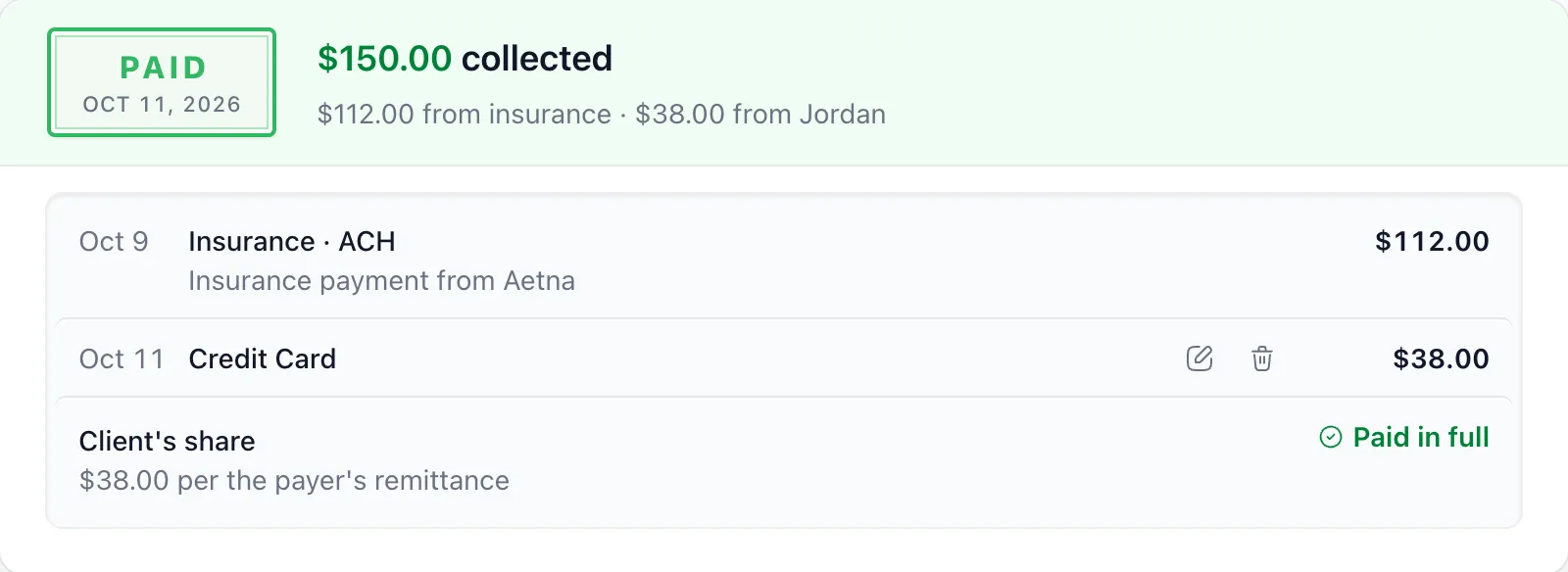
Record payments you collect from the client through the usual payment flow. Payer reversals don’t undo posted payments; see Current limitations.
Correcting an accepted claim
Section titled “Correcting an accepted claim”Once a claim is accepted, you can correct it in two ways: Replace to send a corrected version, or Void to cancel the claim with the payer.
Both depend on the payer returning a payer claim number (also called a payer control number, or PCCN). This is the payer’s own identifier for the claim - they need it on the corrected or void submission to tie it back to the original. The payer claim number can arrive on the acknowledgment or later on the 835 ERA; until then, Replace and Void stay disabled with a “Waiting for … to confirm processing” note on the claim.
Replace or Void
The accepted claim had something wrong: a code, a modifier, the diagnosis tied to a service
You billed the wrong session or client, or shouldn't have billed at all
Edit a form pre-filled from the original. The insurance is locked to the same payer
Confirm. There is no form
It goes through submit and acknowledgment again, and takes the original's place right away. If it doesn't reach the payer, the original comes back
Once acknowledged, the claim and its replacements close. Submit new claim starts over
Original Medicare handles replacements differently and doesn't support void. The claim card says which action isn't supported.
Replace a claim
Section titled “Replace a claim”Use Replace when the original claim was accepted but had something wrong - a procedure code mismatch, a missing modifier, the wrong diagnosis tied to a service. The replacement supersedes the original with the payer.
- From the session, find the accepted claim and click Replace
- The form pre-fills with the original claim’s details. The insurance is locked - replacements have to go to the same payer as the original
- Make your edits and click Submit Replacement
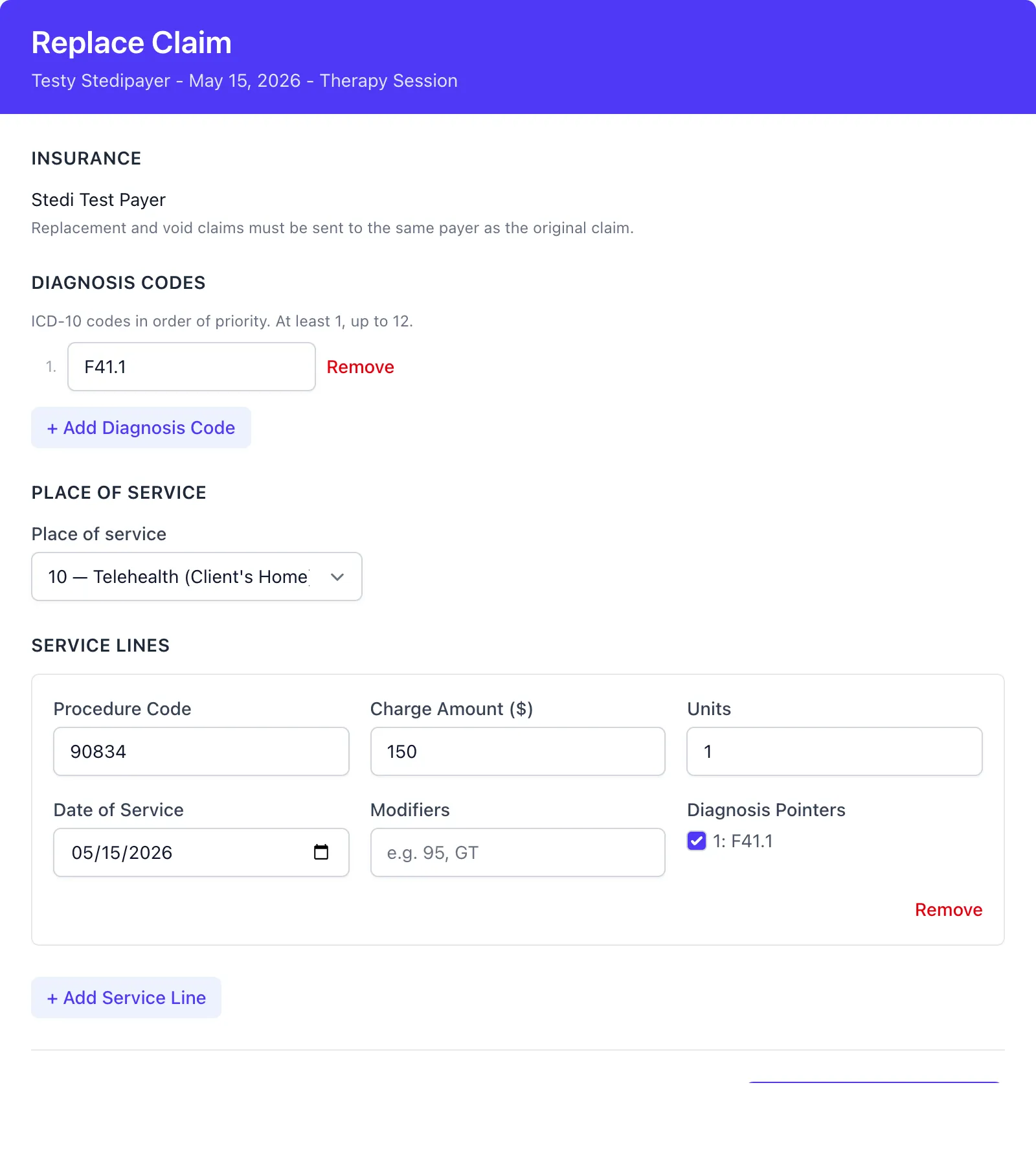
The replacement goes through the same submit and acknowledgment cycle as an initial claim. It takes the original’s place on the session as soon as you submit it. If it doesn’t reach the payer - Stedi rejects it or it fails to send - the original becomes the current claim again.
Void a claim
Section titled “Void a claim”Use Void to retract a claim entirely - typically when you billed the wrong session, the wrong client, or shouldn’t have billed at all. There’s no edit form: HIPAAtherapy sends a void transaction referencing the payer claim number.
Click Void on the accepted claim and confirm. Once the payer acknowledges the void, the claim and any of its replacements are closed.

If you need to bill the session after voiding, use Submit new claim to start over.
When Replace and Void aren’t available
Section titled “When Replace and Void aren’t available”A few cases where these actions won’t show up or stay disabled:
- No payer claim number yet. Wait for the payer to confirm processing. The claim card shows a “Waiting for …” note while we wait.
- Payer doesn’t support that action. Original Medicare handles replacements differently and doesn’t support void at all. The claim card says which action isn’t supported.
Reading claim details
Section titled “Reading claim details”The claim Details page shows the identifiers for the current claim - HIPAAtherapy’s claim tracking number, the payer claim number (once it arrives), the Stedi claim ID, and the Intent (Replacement or Void) for any non-initial claim.
Current limitations
Section titled “Current limitations”Here’s what isn’t supported in the app yet, so you can plan around it.
Reversals and the client’s share
Section titled “Reversals and the client’s share”When a payer pays a claim, HIPAAtherapy records that payment in your ledger for you - see Payments and denials. Two kinds of money movement still don’t post on their own:
- The client’s share. When the payer leaves a balance for the client - a copay, coinsurance, or deductible - collect it and record it through the normal payment flow, the same as any other client payment.
- Reversals. The reversal shows on the claim, but the posted payment stays unchanged. Insurance payments are read-only; there isn’t an in-app adjustment workflow yet.
Appealing a denial
Section titled “Appealing a denial”When the payer denies a claim, the denial and its reason codes show on the claim. If the payer returned a claim number, you can Replace the claim with a corrected version. A formal appeal - disputing a denial you believe is wrong - isn’t an in-app workflow yet; handle that through your payer portal.
Frequently asked questions
Section titled “Frequently asked questions”Does “Accepted” mean I’ve been paid? No. Accepted means the payer has queued the claim for review. When the payer finishes, the claim shows the outcome - paid, denied, or the client’s share. See Payments and denials.
How do I know if a claim was paid or denied? The claim shows the result on the session once the payer’s payment report arrives, usually a few weeks after acceptance. You don’t have to fetch anything - HIPAAtherapy pulls the report in automatically, as long as you’re enrolled with the payer for ERA delivery. When the payer pays, that payment posts to your Payments ledger on its own; the client’s share is still yours to collect through the normal payment flow.
Can I resubmit a rejected claim? Yes. Correct and refile opens a fresh claim form for the same session. If the form refuses to submit because the previous rejected claim is still blocking a new submission, Delete the rejected claim first and then refile.
What if I pick the wrong insurance at submission? For rejected claims or failures before sending, use Delete and file a new claim. After a timeout with unconfirmed delivery, deletion and refiling stay unavailable while HIPAAtherapy checks the outcome. Pending and submitted claims can’t be edited or canceled in the app. For accepted claims, use Void when available, then submit against the correct insurance.
What’s the difference between Replace and Void? Replace sends a corrected version of the claim - same session, same payer, with your edits. Void cancels the claim entirely. Both need the payer to have returned a payer claim number first.
Can I still bill clients directly? Yes. Claim submission is optional per session. Cash, card, and invoice flows work independently of the insurance workflow. See Payments for details.
Do I have to enroll with a payer before I can bill it? Only for payers that require it. Most payers accept claims as soon as your practice’s billing details are set. When one needs enrollment first, the claim form says so and points admins to Practice Settings > Insurance - see Enrolling with payers. Enrollment is admin-only.
How do I submit a claim for an out-of-area Blue Cross Blue Shield plan? Out-of-area Blue claims usually go to the Blue plan where you practice, which routes them to the client’s home plan using the prefix on the member ID. HIPAAtherapy sends each claim to the payer on the client’s insurance record, so select your local Blue plan as the payer there and keep the member ID exactly as it appears on the card, prefix included. For example, a Vermont therapist seeing a client with a BCBS of Texas card picks Blue Cross and Blue Shield of Vermont. Federal Employee Program and dental claims are exceptions, so check with your local Blue plan when you’re unsure.