Two-Factor Authentication
HIPAAtherapy supports two-factor authentication (2FA) for staff accounts using passkeys (Touch ID, Face ID, Windows Hello, or security keys) with backup codes as fallback.
How Sign-In Works with 2FA
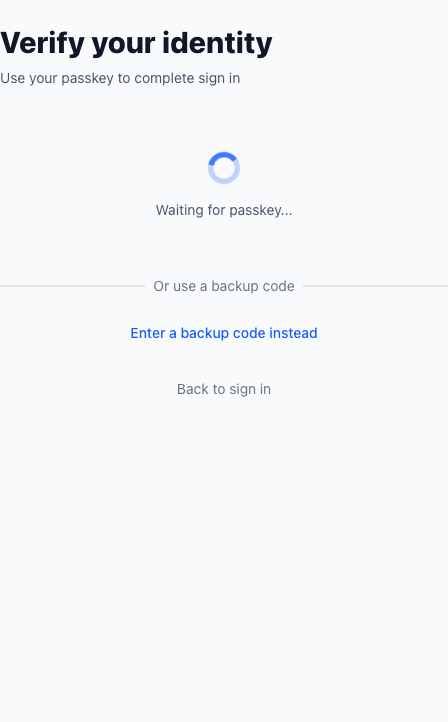
Section titled “How Sign-In Works with 2FA”When 2FA is enabled, sign-in has two steps:
- Enter your email and password
- Verify with your passkey (or a backup code)
Security Limits
Section titled “Security Limits”- Remember me is ignored for 2FA-protected sign-ins
Enabling Two-Factor Authentication
Section titled “Enabling Two-Factor Authentication”- Go to My Profile
- Under Two-Factor Authentication, click Enable two-factor authentication

- On the passkey page, enter a passkey name and your current password
- Click Register passkey and complete your browser/device prompt
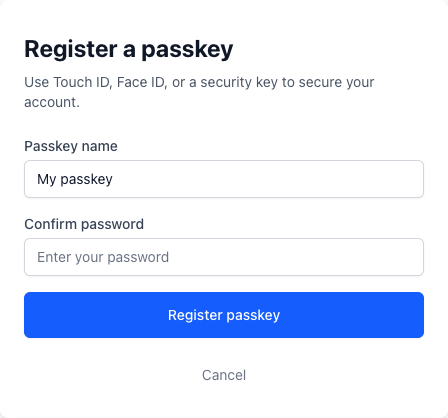
When your first passkey is registered, HIPAAtherapy automatically enables 2FA and generates backup codes.
Save Your Backup Codes
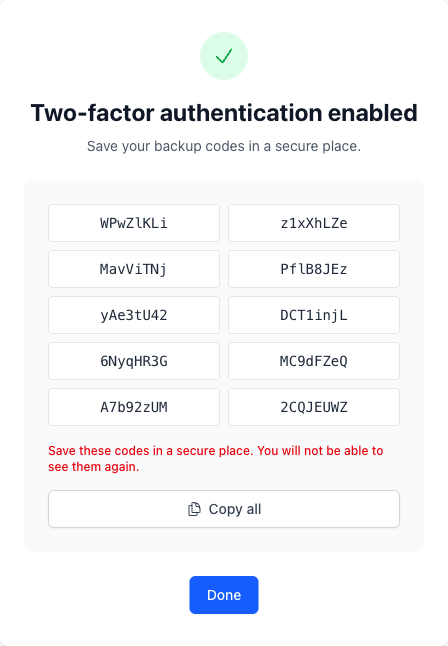
Section titled “Save Your Backup Codes”After setup, you’ll see 10 backup codes one time.
- Each code can be used once
- You won’t be able to view the same codes again
- Save them in a secure place (for example, a password manager)
Managing Passkeys and 2FA
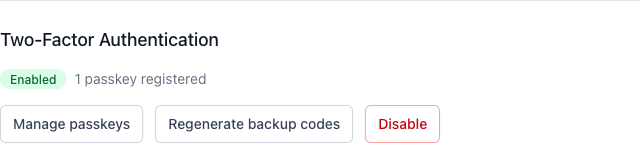
Section titled “Managing Passkeys and 2FA”From My Profile > Two-Factor Authentication, you can:
- Manage passkeys
- Regenerate backup codes (requires your password and invalidates previous codes)
- Disable 2FA (requires your password)
Important behavior:
- You must have at least one passkey before enabling 2FA
- If you remove your last passkey, 2FA is disabled automatically
Using a Backup Code During Sign-In
Section titled “Using a Backup Code During Sign-In”On the verification screen, click Enter a backup code instead and submit one unused backup code.
If you’re out of backup codes, sign in with your passkey and regenerate new codes from your profile.
Frequently Asked Questions
Section titled “Frequently Asked Questions”How can I add a passkey on my phone if my current passkey is only on my laptop? If your passkey isn’t synced across devices and you can’t complete 2FA on your phone, follow these steps:
- From your laptop (or any device where you can still sign in), temporarily disable 2FA in My Profile > Two-Factor Authentication.
- Sign in on your phone, then add a new passkey from My Profile.
- Re-enable 2FA once the phone passkey is saved.
Can I use an authenticator app code (TOTP)? No. HIPAAtherapy currently supports passkeys and backup codes.
Do backup codes expire? Not on a timer, but regenerating codes immediately invalidates older ones.
2FA is one part of how we protect your data. See our Trust Center for the full picture - encryption, access controls, audit logging, and more.